
Strategy ONE
All Other derived element
The All Other derived element collects all attribute elements that are not included in other derived elements, and displays them on the report as individual attribute elements by default. This derived element is created automatically when the first derived element is created for an attribute. An All Other derived element can only be deleted by deleting all derived elements.
Because it is created automatically, the All Other derived element is created and implemented without having to take note of it at all. For example, recall the report created with a Filter derived element (see Filter derived element) that included Southern Regions and Northern Regions derived elements as shown below.
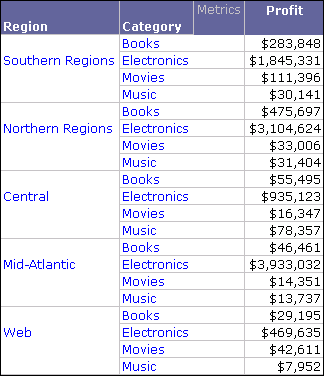
Central, Mid-Atlantic, and Web are all attribute elements that are not included in any derived elements. The All Other derived element gathers these remaining attribute elements, and displays them on a report as individual attribute elements.
You can also include all of the attribute elements that are part of the All Other derived element as one consolidated element on a report (see Displaying derived elements or their attribute elements).
While this is the most common way the All Other derived element is used, you can define attribute elements included in other derived elements to also be included as part of the All Other derived element. For information on including attribute elements in the All Other derived element, see Displaying derived elements and their attribute elements simultaneously.