
Strategy ONE
Derived elements and drilling on reports
Drilling allows you to view displayed report data at levels other than that returned in the original grid or graph report. You can investigate the data in your report quickly and easily with the help of drilling. It allows you to execute another report based on the original report to get more detailed or supplemental information.
When you drill on attribute elements in a report, the resulting report restricts the results to data only for the attribute elements used when drilling. For example, if you drill from the Year 2007 attribute element down to Quarter, the resulting report only includes quarters that are within 2007.
The same standard applies to drilling on derived elements. Drilling on a derived element restricts the resulting report to only data for the attribute elements used to define the derived element.
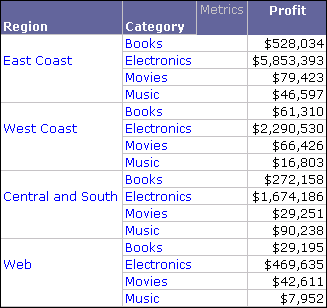
For example, the report below shows East Coast, West Coast, and Central and South derived elements based on the Region attribute.
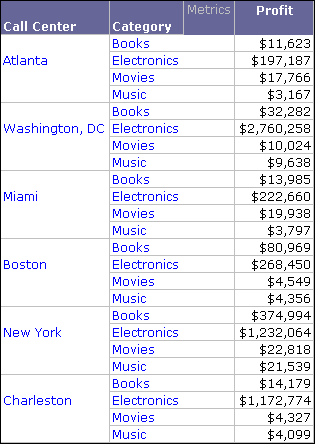
If you drill down from the East Coast derived element to Call Center, the resulting report shown below returns data for Call Centers within the East Coast regions (Northeast, Mid-Atlantic, Southeast).
Drilling is covered in greater detail in the Basic Reporting Help.