
Version 2021
Query Execution (and Pre\Post)
No PostgreSQL specific customizations were made for this feature.
See KB14618: How do pre/post statements in the VLDB properties affect the SQL statement when executing reports in Microstrategy Developer? for more information.
MicroStrategy allows you to input customized SQL in between multi-pass SQL by using VLDB properties for Pre/Post Statements.
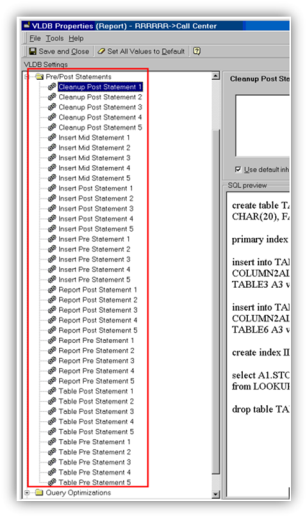
To open the VLDB Properties (Report) editor, go to Data > VLDB Properties in a MicroStrategy report. Under Pre/Post Statements, there are several options to help the user insert customized SQL statements into different sections of the datamart SQL statement.
There are eight statements to insert into a SQL statement:
- Cleanup Post Statement
- Insert Mid Statement
- Insert Post Statement
- Insert Pre-Statement
- Report Post-Statement
- Report Pre-Statement
- Table Post-Statement
- Table Pre-Statement
The image below demonstrates some of the statements and the table below summarizes the Pre/Post Statements VLDB properties.
The table below summarizes the Pre/Post Statements VLDB properties. Additional details about each property, including examples and a list of wild cards, are available by clicking on the links in the table.
For more information, see the System Administration Help.
|
Property |
Description |
|---|---|
|
Appends string after final drop statement. |
|
|
SQL statements included after the CREATE statement used to create the data mart. |
|
|
SQL statements included before the INSERT statement used to insert data into the data mart. |
|
|
SQL statements included before the CREATE statement used to create the data mart. |
|
|
Defines whether the database connection is dropped after user-defined SQL is executed on the database. |
|
|
SQL statements issued after element browsing requests. |
|
|
SQL statements issued before element browsing requests. |
|
|
SQL statements issued between multiple insert statements. For the first four statements, each contains single SQL. The last statement can contain multiple SQL statements concatenated by “;”. |
|
|
SQL statements issued after CREATE, after first insert only for explicit temp table creation. For the first four statements, each contains single SQL. The last statement can contain multiple SQL statements concatenated by “;”. |
|
|
SQL statements issued after CREATE before first insert only for explicit temp table creation. For the first four statements, each contains single SQL. The last statement can contain multiple SQL statements concatenated by “;”. |
|
|
SQL statements issued after report requests. For the first four statements, each contains single SQL. The last statement can contain multiple SQL statements concatenated by “;”. |
|
|
SQL statements issued before report requests. For the first four statements, each contains single SQL. The last statement can contain multiple SQL statements concatenated by “;”. |
|
|
SQL statements issued after creating new table and insert. For the first four statements, each contains single SQL. The last statement can contain multiple SQL statements concatenated by “;”. |
|
|
SQL statements issued before creating new table. For the first four statements, each contains single SQL. The last statement can contain multiple SQL statements concatenated by “;”. |