
Connecting to the Strategy Metadata
Strategy is retiring legacy administration tools in phases as capabilities move to Workstation, now available in the browser. December 2026 is last supported release for server legacy tools including, Developer, Command Manager, and Object Manager. For more information on legacy tool end of support, see Legacy Tools & Platform: End of Support Reference. For feature level details, see the Workstation vs Legacy Tools Feature Parity dashboard.
Strategy users need connectivity to the metadata so that they can access projects, create objects, and execute reports. Intelligence Server connects to the metadata by reading the server metadata connection registry when it starts. However, this connection is only one segment of the connectivity picture.
Consider these questions:
- How does a Developer user access the metadata?
- How does a user connect to Intelligence Server?
- Where is the connection information stored?
The diagram below illustrates three-tier metadata connectivity between the Strategy metadata database (tier one), Intelligence Server (tier two), and Developer (tier three).
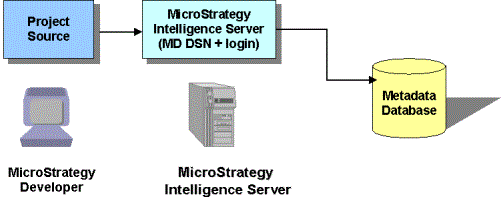
In a server (three-tier) environment, Developer metadata connectivity is established through the project source. For steps to create a project source, see the Installation and Configuration Help.
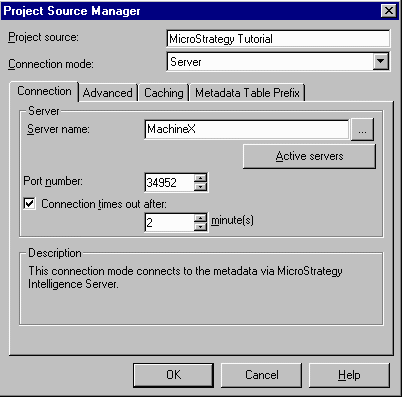
You can also create and edit a project source using the Project Source Manager in Developer. When you use the Project Source Manager, you must specify the Intelligence Server machine to which to connect. It is through this connection that Developer users retrieve metadata information.
The Developer connection information is stored in the Developer machine registry.