
Create API Tokens For Other Users
Starting in Strategy (September 2026), you can enable users to create tokens for other users. This allows users to avoid bottlenecking issues gathering API tokens and allows administrators to manage the user API token lifecycle including viewing API token metadata information, and creating, refreshing, and deleting API tokens.
Prerequisite
-
Enable the Allow user to create API tokens for other users server-level setting. For more information on accessing this setting, see Edit All Server-Level Settings.
To enable and disable this setting, you must have the Administer environment and Configure security settings.
-
You must have the Create and edit users and groups privilege.
View API Token Metadata Information
The API token tab displays all API token metadata information in the environment.
The service accounts' API tokens do not display.
- Open the Workstation window.
-
In the Navigation pane, click Users & Groups.
- Select an Environment from the upper-left drop-down list.
-
In the left pane, click API Token.
-
View the following API token metadata:
- Username: The username of the API token owner.
- Username (Login): The login name of the API token owner.
- Token Status: Whether the token is Active and can be used or Expired.
- Expires On: The expiration time and date of the API token.
- Days left: The amount of days until the API token expires.
- Created On: The time and date the API token was created.
- Created By: The username of the API token creator.
- Actions: A New button to refresh the API token and a Delete button to revoke the API token.
Create User API Tokens
- Open the Workstation window.
-
In the Navigation pane, click Users & Groups.
- Select an Environment from the upper-left drop-down list.
- In the left pane, click API Token.
- Click Create API Token.
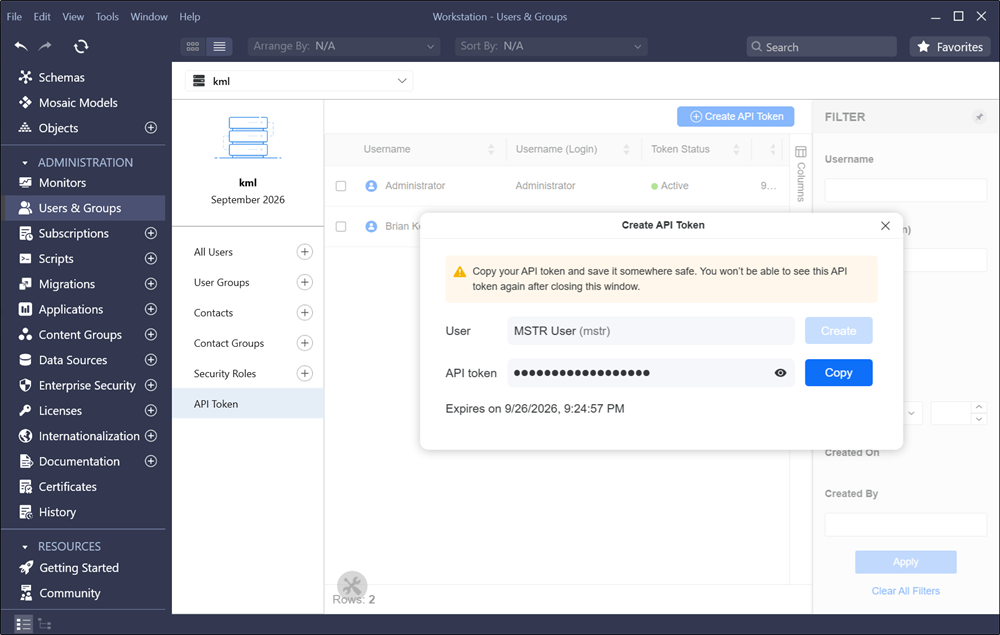
- Search the user you want to create an API token for and click Create.
-
Click Copy next to API token.
Save the API token somewhere safe. You will not be able to see the API token again after you close the window.
-
Note the Expires on value under API token. Your API token will only be valid until that date and time.
-
Close the Create API Token dialog.
Refresh API Token
- Open the Workstation window.
-
In the Navigation pane, click Users & Groups.
- Select an Environment from the upper-left drop-down list.
- In the left pane, click API Token.
- In the Actions column of the token, click New.
- Click Create and Copy.
-
Close the Create API Token dialog.
Revoke API Token
- Open the Workstation window.
-
In the Navigation pane, click Users & Groups.
- Select an Environment from the upper-left drop-down list.
- In the left pane, click API Token.
- In the Actions column of the token, click Delete.
- In the Delete API Token dialog, click Delete.
Restrict Users from Creating API Tokens for Other Users
-
Disable the Allow user to create API tokens for other users server-level setting. For more information on accessing this setting, see Edit All Server-Level Settings.
-
Note the following behavior after disabling the setting:
-
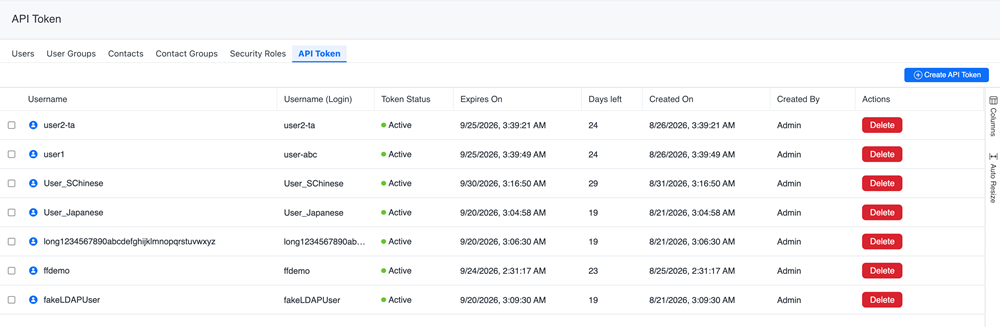
The New button under the Actions column no longer displays. Therefore, administrators can not refresh the API token for other users.
-
If you click Create API Token, the user value is only the account you're currently logged in with and can not be updated.
-