
Reuse and Share Custom Instructions and Column Descriptions Among Agents
Beginning in Strategy One (September 2025), enhanced bots are available out of the box and have been renamed to agents to reflect the improvements and advancements.
-
For details on the 2.0 enhancements, see Agent Enhancements.
Beginning in Strategy One (June 2026), you can manage custom instructions and column descriptions more effectively by reusing and sharing tuning information among agents. Download an agent's tuning file, which contains its custom instructions and/or column descriptions, then upload the file to another agent.
The tuning file is saved as a JSON file.
Download the Tuning File for an Agent
- Create a new agent or open an existing agent and click the Edit
 icon in the upper right.
 - Refine the agent's custom instructions and column descriptions so the agent behaves as you want.
- In the toolbar, click Agent Tuning
 and select Download Current Tuning.
 - In the Download Tuning File dialog box, both Custom Instruction and Column Description are selected by default. Clear the check box next to any information you do not want to include in the file.
- Click Download.
The JSON file is downloaded, named for the agent.
Upload a Tuning File to Reuse Another Agent's Tuning
Download the tuning file from the agent to use as the source.
You should download the current information for the target agent, so you can re-apply the settings if the uploaded file does not work as expected with the source.
- Create a new agent or open an existing agent and click the Edit icon in the upper right.
- In the toolbar, click Agent Tuning and select Upload Tuning File.
- Navigate to the folder where the tuning file is saved, select it, and click Open.
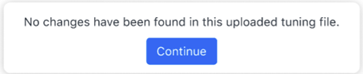
- If the tuning file matches the agent's tuning, click Continue to close the informational box. You have completed the procedure.
- If any changes were found, the Preview Changes dialog box opens. Changes are listed on the separate Custom Instruction and Column Description tabs.
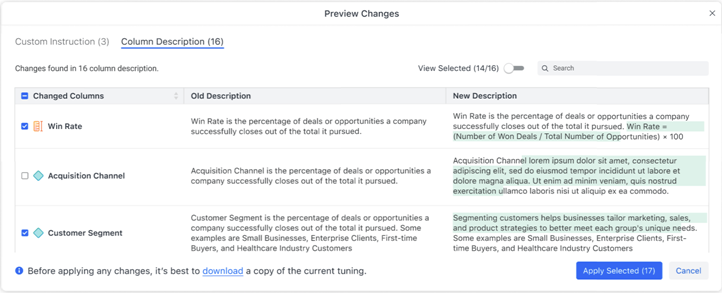
- By default, all changes will be made, but you can clear the check box for any change you do not want to make. For example, in the image above the new description for the Acquisition Channel column contains gibberish and should not be used. Its check box is cleared.
- If you did not download the agent's current tuning information, click Download. The JSON file is downloaded, named for the agent.
- Click Apply Selected.
- Save the agent.