
Re-order Objects in a Modern Grid
Starting in Strategy One (June 2026), you can re-order objects in modern grids that contain object parameters. Before this release, once you placed an object parameter on the grid, objects could not be re-ordered.
Use this feature to preserve a custom object order in the grids. Both dashboard designers and end users can freely re-arrange objects in the grid. This provides designers with more control over the layout, while allowing users to manipulate the grid to suit their needs.
-
Preserves user intent: Manual ordering is no longer discarded during prompt resolution in supported scenarios.
-
Improves usability: Dashboard designers work with object-parameter-based grids more naturally using drag and drop.
-
Reduces confusion: The grid layout remains consistent after saving, reopening, re-executing, and related personalization flows.
-
Supports mixed layouts: Grids containing both object parameters and normal objects retain the intended visible order within supported boundaries.
You can re-order objects in modern grids that contain object parameters with a single column set or a single row set.
When you drag and drop objects (normal objects or those from parameters) on the grid layout:
-
Unordered object parameters follow existing behavior. If the objects from an object parameter have never been reordered on the grid, or if they have been rearranged back into the same contiguous sequence defined in the Object Parameter Editor, the object parameter is considered unordered on that grid axis. In this state, the order of these objects continues to be determined by the Object Parameter Editor.
-
When users select additional objects from the object parameter selector, those objects are inserted at the position defined by the Editor instead of always being appended to the end.
-
If users change the object sequence in the object parameter editor, the order of the resolved objects on the grid is updated accordingly.
-
-
Reordered object parameters follow new behavior. If the objects from an object parameter are reordered on the grid and no longer follow the original contiguous sequence defined in the Object Parameter Editor, the grid axis containing that object parameter is considered reordered.
-
In this state, the grid axis preserves the user's custom arrangement. Any newly selected object from the object parameter selector is always appended to the end of the grid axis, and changing the object sequence in the Object Parameter Editor no longer changes the order of those objects on the grid.
-
When you add or reorder objects on the Editor panel:
-
Even though multiple objects can be selected from an object parameter, the parameter displays as a single object in the Editor panel, with its position determined by the first selected object on the grid axis.
-
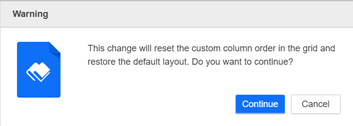
When an axis contains a mix of normal objects and objects from object parameters, adding or reordering objects using the Editor panel can reset the existing custom order back to the default sequence defined in the Object Parameter Editor. In this scenario, a confirmation message displays. Select one of the following:
-
Continue to proceed with the action and reset the grid to the default order
-
Cancel to stop the action and keep the current layout unchanged
-