
Configure Warehouse User Passthrough
Strategy (August 2026) adds Authentication settings to project properties. Use the Authentication tab to configure warehouse user passthrough, which allows each user to connect to the data warehouse using their own credentials, enabling accurate auditing, policy enforcement, and compliance in environments where only standard authentication is available.
- Open the Workstation window.
- In the Navigation pane, click Projects.
- Right-click a project and choose Properties.
-
In the left pane, click Authentication.
-
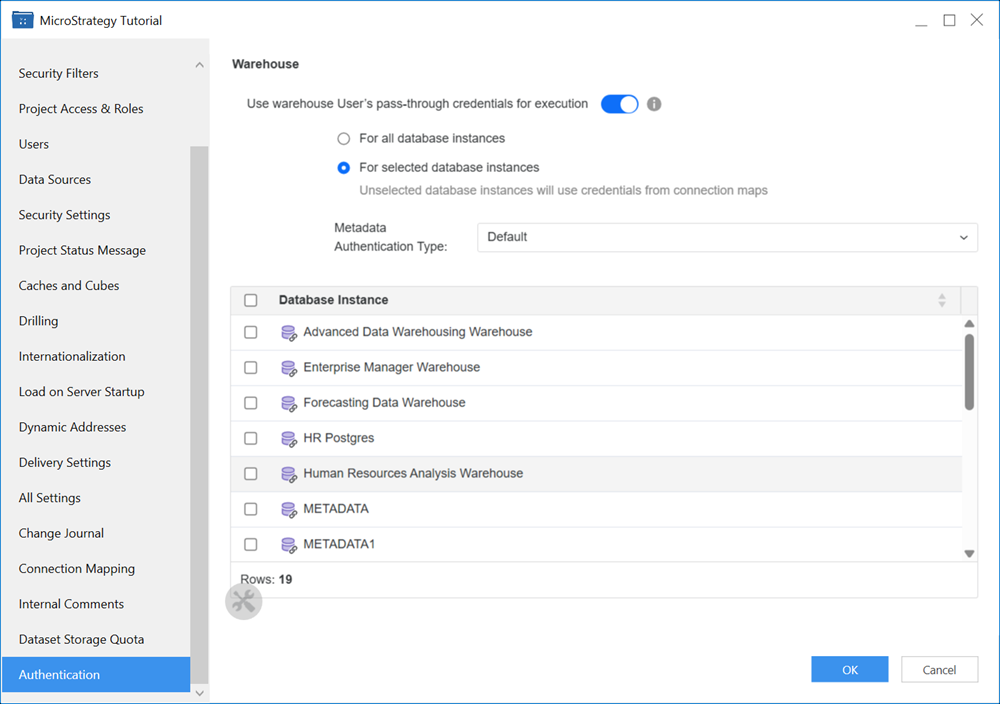
Toggle on Use warehouse User's pass-through credentials for execution.
-
Choose whether to provide pass-through access to all or select databases.
-
If you select For selected database instances:
-
Expand the Metadata Authentication Type drop-down list and choose an authentication type.
-
Select a check box next to the Database Instances you want to configure warehouse passthrough.
-
-
Click OK.
-
In the Navigation pane, click Users & Groups.
-
Right-click the user you want to pass warehouse credentials to and click Edit.
-
In the left pane, click Authentication.
-
In Warehouse passthrough Login and Warehouse passthrough password, enter the username and password for the user to use when logging in to the warehouse.
-
Click Save.