
Bursting for FTP Subscriptions
Bursting in Strategy distribution services allows administrators to send reports and documents to a dynamic list of recipients with data sliced by FTP location. Bursting is used when you must send personalized slices of data to multiple users with each user having a definite access to the data based on the user’s security in the system. Bursting allows easy distribution of data to multiple recipients dynamically and delivers data in a single report execution enhancing the performance.
-
Open the Workstation window with the Navigation pane in smart mode.
- In the Navigation pane, inside the Administration group, click
 next to Subscriptions.
 - Choose an environment and project, then click Select.
- Type a Name for the subscription.
-
From the Type drop-down list, choose FTP.
-
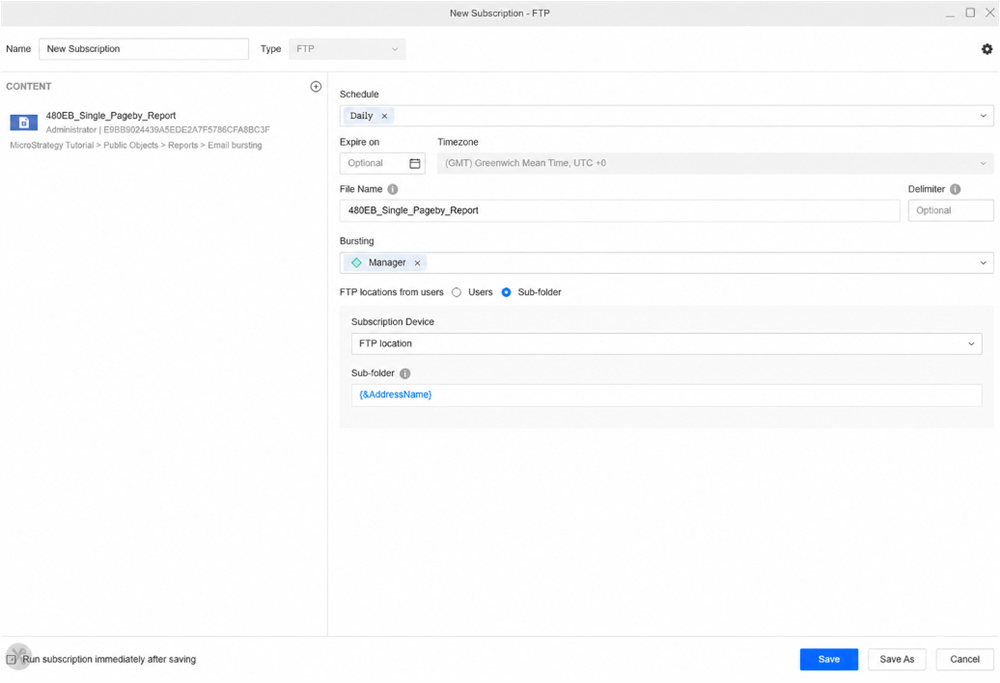
Add the report or document to deliver via burst.
The Bursting field displays when the content you add contains an attribute available for bursting.
-
Expand the Bursting drop-down list and select the check box next to the attributes you want to use for bursting.
-
Click Add User and choose the FTP subscription recipients.
-
Click Save.