
Monitor Quick Search Indices
Rebuild a Quick Search Index
-
Open the Workstation page.
- In the Navigation pane, click Monitors.
- In the left pane, click Quick Search Indices.
Project Name The name of the project.
Index Status The status of the index. The index status should always be Complete. If the status is Failed, rebuild the index.
Searchable Items The number of objects that can be searched in the project.
Last Update The date and time the index is automatically updated for changes in the metadata.
Last Incremental Update The date and time the index is last manually updated.
Project ID The project GUID.
- Right-click the project you want to rebuild indices for and choose Rebuild.
Quick Search Index Settings
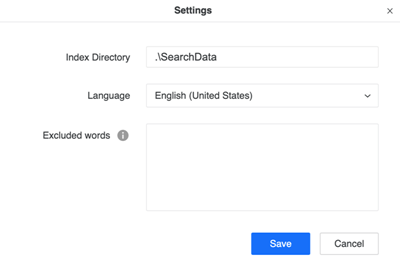
You can use the quick search index settings to configure the search index directory on the server. You can further configure languages for searches and exclude words from searches.
-
Open the Workstation page.
- In the Navigation pane, click Monitors.
- In the left pane, click Quick Search Indices.
- Click Settings.
- Type the Index Directory path configured on the Intelligence Server.
- Select your desired Language from the drop-down list.
- Type the list of words excluded from searches in Excluded Words. The list can contain conjunctures and prepositions to reduce the scope of search.
- Click Save.
When to Rebuild an Index
The following scenarios may require you to rebuild a search index:
- If you switch the metadata in your environment with a copy of the currently used metadata, like the backup of the current metadata, a rebuild will be required. Quick Search cannot distinguish the copies of a metadata.
- If you upgrade your environment, a rebuild may be necessary.
- If the index status of a project is in a Failed state.
- If you cannot search your objects normally, a rebuild may be necessary.