
Manage ACLs for Folders and Child Objects
Starting in Strategy (September 2026), you can define whether permissions apply to all subfolders and nested items.
Folder and Object Inheritance
Child folders inherit both Object and Children permissions, while child objects inherit only Children permissions.
Manage ACL Permissions for Child Objects and Folders
-
Open the Workstation page.
- In the Navigation pane, click Browse Folders and navigate to the desired folder.
-
Right-click the folder and select Properties.
-
In the left pane, click Security Access.
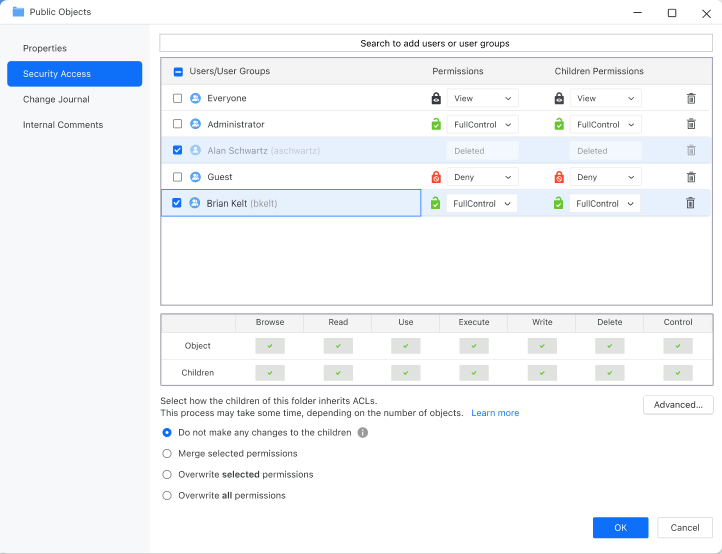
-
Modify the Children Permissions for any of the users or user group and select how the children inherit ACLs.
The following options are available:
-
Do not make any changes to the children
-
The change applies only to the folder where it was made and does not affect existing children. Any new folders or objects added to this folder will inherit the updated ACL permissions.
-
-
Merge selected permissions
-
Will merge existing and new ACL permissions.
-
-
Overwrite selected permissions
-
Only rows selected with the checkbox are propagated. This means that if multiple changes are made to multiple rows of users and user groups, any unchecked rows apply only to the current folder, while the checked rows will be propagated to—and will replace—the child folders and child objects.
-
-
Overwrite all permissions
-
Propagates the entire ACL permissions to child folders and child objects, regardless of the currently selected checkboxes.
-
-
-
Starting in Strategy (September 2026), optionally select Apply changes recursively to apply permissions to all subfolders and nested items. If you leave the check box deselected, ACL changes apply only to direct child objects.
-
Click Save.