Create an Incremental Refresh Report for a Cube with a Template
Starting in Strategy (November 2026) you can create incremental refresh report for a cube that uses a shortcut to a template.
Prerequisites
To create an incremental refresh report you need Web use metric editor and Create application objects privileges
Create an Incremental Refresh Report for a Cube with a Template
-
Navigate to your cube in Workstation.
-
Right-click the cube name, point to New, and select Incremental Refresh Report from "Cube Name".
- In Refresh Type, select the refresh method from the following options:
- Update: Adds new data if it does not already exist in the Intelligent cube. If there are matches between the data, the values are updated.
- Insert: Adds only new data that is fetched by the IRR to the Intelligent cube without altering existing data in the cube.
- Delete: Removes existing data from the Intelligent cube if it matches the definition criteria in the IRR.
- Update Only: Replaces the existing Intelligent cube. This option does not add new data to the Intelligent cube.
- Replace Available for incremental refresh filters.
-
You can modify the filter definition by adding qualifications to the Filter panel.
-
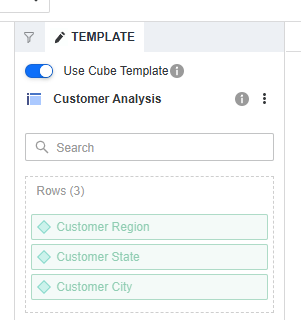
In the Template panel, keep the toggle Use Cube Template selected to use the report filter of the incremental refresh report and target Intelligent Cube's template during execution . Modifying objects in the drop zones is disabled if you select this option.
-
To use both the template and the filter of the incremental refresh report during execution, clear the Use Cube Template toggle. This refresh type allows selecting specific metrics from the targeted cube template to refresh.
This option is not available for the refresh type: Replace.
-
Click Save As or Save and Execute.