
Create a Delivery Device
For more information, see Email Signing and File Encryption.
Use delivery devices to define the format and transmission process to send reports, documents, and dashboards to users with subscriptions.
-
Open the Workstation page.
- In the Navigation pane, click Environment Settings.
- Click the Environment tab.
- In the left pane, click Subscription Delivery.
-
Click Delivery Device to view the delivery devices configured for the environment.
-
Click
 Add Delivery Device.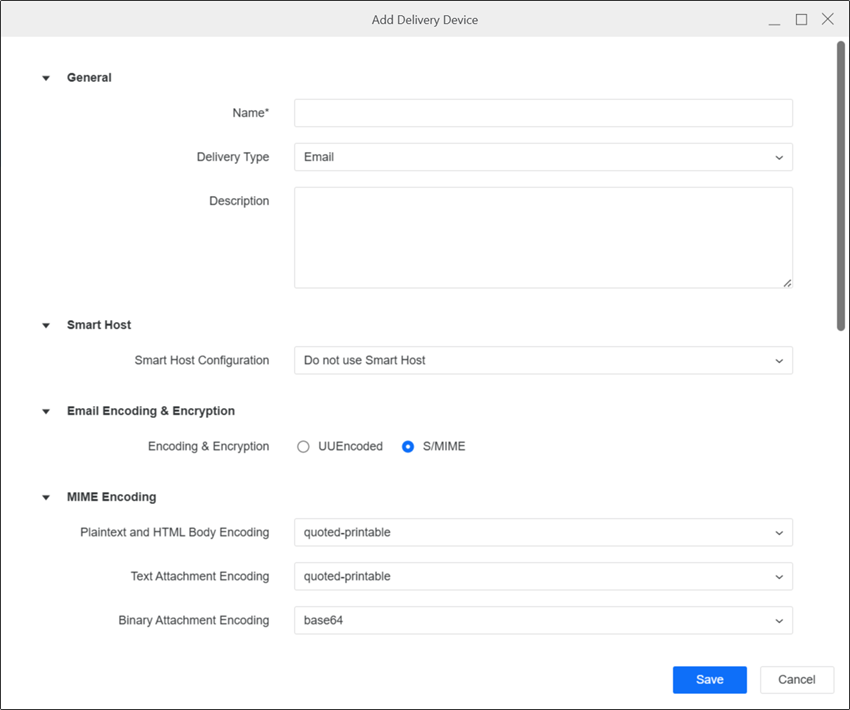
-
Select a delivery type and complete the corresponding fields.
EmailGeneral Choose a Name, Delivery Type, and Description for the device.
Smart Host A smart host is a machine that receives all outgoing emails and is responsible for sending content to the final destination. Use these settings if you have a powerful email server for all outgoing emails. The communication between Intelligence server and the smart host is faster than the communication between Intelligence server and the email host of each recipient.
- Do not use Smart Host Will not set the Smart Host Configuration.
- Use Smart Host when delivery fails An email is sent using only the smart host to the email host of each recipient; the smart host is used only if the delivery fails.
- IP Address/Server Name Enter the IP address or server name of the smart host.
- Port Number Enter the port number of the smart host.
- Always Use Smart Host (without authentication) An email is sent using only the smart host to the email host of each recipient and the smart host is used without authentication.
- IP Address/Server Name Enter the IP address or server name of the smart host.
- Port Number Enter the port number of the smart host.
- Always Use Smart Host (with authentication) An email is sent using only the smart host to the email host of each recipient and the smart host is used with authentication.
- IP Address/Server Name Enter the IP address or server name of the smart host.
- Port Number Enter the port number of the smart host.
- Authentication Mode (Basic) Users are able to configure OAuth authentication for the Exchange Server as a smart host.
- Username Enter the username that requires authentication.
- Password Enter the password for the username defined in your smart host email service.
- Authentication Mode (OAuth) Select OAuth providers, including Microsoft Entra ID (formerly Azure AD) and Generic IAM, to configure OAuth authentication.
- Username Enter the username that requires authentication.
- Password Enter the password for the username defined in your smart host email service.
Email Format Choose an email format.
-
UUEncoded This e-mail format is suggested for any e-mail client or gateway that does not support MIME. It only allows one plain text body in US-ASCII and any number of attachments. This format does not support HTML body. The fields in the email such as recipient display names, subject, and so on must be in US-ASCII. The attachments are encoded using the UNIX-to-UNIX method, which is supported by most email clients and third-party software.
-
S/MIME Allows multiple email bodies and multiple character sets, and allows the device to support email sensitivity settings such as Confidential. Character sets other than US-ASCII can be used. Multi-part, related, and alternative email bodies and text headers are also supported. For more details regarding MIME option, see the description below.
Email Format - MIME Options Define the type of encoding your email device requires.
-
Plaintext and HTML Body Encoding Select the encoding type for emails with plaintext and HTML bodies. The default encoding for these emails is quoted-printable.
-
Text Attachment Encoding Select the encoding type for emails with text file attachments. The default encoding for these emails is quoted-printable.
-
Binary Attachment Encoding Select the encoding type for emails with binary file attachments, such as PDF, CSV, Excel, Flash dashboard, and so on. The default encoding for these emails is base64.
-
Quoted-printable encoding preserves most printable characters and only encodes non-printable or special characters. You can read the encoded text, unlike base64 encoding, but it does not preserve space. You can use quoted-printable only for text files, HTML, or plain text message bodies and not for binary data.
-
Base64 encoding is strongly recommended for any binary, image, or multi-byte character set data. It uses the following alphabet: [A-Z][a-z][0-9]'+','/'. This results in all of the binary data being encoded into printable characters that can be transmitted over the Internet without bit loss.
-
7-bit ASCII encoding is used for representing the characters as binary numbers. The ASCII encoding includes the printable characters and control characters for carriage return, backspace, and other controls. You can use the 7-bit ASCII encoding for plaintext and HTML email bodies.
-
-
Use US-ASCII for Subject, Attachment Names, and Display Names Some devices do not support the use of character sets other than US-ASCII for certain sections of multi-part MIME emails. These email sections include the subject line, the names of attached files, and the address display names. Select this check box to ensure that such devices can process emails correctly.
If this toggle is enabled, you must ensure that the names of any files being sent as attachments from this device are not more than eight characters in length and use only standard ASCII characters. The subject must also contain only ASCII characters. If any of these conditions are not met, the email is not sent.
-
Do not put quotes around non US-ASCII Display Names Enable if the email client displays an extra set of double quotes around the display names. This avoids encoding a set of quotes along with the display names, which is superfluous when the email client adds an extra set of quotes around the decoded string.
-
Embed HTML Attachments Enable the toggle to embed HTML attachments in the email body. If HTML attachments are not embedded, they are sent as unrelated attachments.
-
Embed Adobe Flash Content Enable the toggle to support Flash content in the body of the email. Flash content is sent whenever the device sends documents that contain Strategy widgets.
-
Use only tables to position elements in HTML Enable the toggle to use only HTML tables to format your HTML email.
-
Use inline style CSS Enable the toggle to format your email using inline CSS, instead of external CSS.
-
Message Settings Sensitivity Select either Personal, Private, or Confidential if you want this device to support your email client's sensitivity feature. If your email client allows users to apply a sensitivity setting to an email being sent, then selecting one of these options places a message at the top of emails sent through Distribution Services. Selecting Normal does not apply any sensitivity message in an email's header, even if a sensitivity level is applied to the email being sent by the user.
S/MIME Signing & Encryption Settings
For more information, see Email Signing and File Encryption.
-
Security Level Select the email security level to determine if emails should be encrypted and encrypted for all recipients.
-
Enable S/MIME Signing Toggle on this option to enable S/MIME signing to use a public key to ensure security and authenticity.
-
Certificate File Click Upload and find the certificate file for S/MIME signing.
-
Private Key Click Upload and find the private key for S/MIME signing.
Delivery Settings
-
Number of retries Type the number of times the delivery device should reattempt to send a subscription if it fails.
-
Time between retries (sec) Type the amount of seconds the delivery device should wait before attempting to send a subscription if it fails.
FileGeneral Choose a Name, Delivery Type, and Description for the device.
File Location
-
File Location Enter the location where you want the file to be delivered.
-
Allow and append user entered path Select to provide users an option to enter a file location when they subscribe to a report or document from Strategy Web.
File System Options
-
Create required folders Enable to have the system automatically create folders if the specified file path is not available.
-
File Options
Append timestamp to file name Select to automatically add the date and time of file creation to the end of the filename.
Overwrite files with same name If files with the same name already exist in the specified location, select this option to automatically overwrite older files with newer files of the same name.
Append to text file If text files with the same name already exist in the specified location, you can append the contents of the new text file to an existing file. For example, if you have a file device with this option selected when the file device sends a text file to the file location for the first time, the text file is saved to the folder. After that, whenever a text file is sent with the same name, the contents of the newer file are added to the existing file.
Backup Location
-
Save messages to backup location if delivery fails Enable to save to a backup location if delivery fails.
-
File Location Enter a path for delivering files to a backup location.
Delivery Settings
-
Number of retries Specify how many times a file delivery will be attempted if a temporary failure occurs. The default value is 5.
-
Time between retries (sec) Specify how much time should elapse between a failed delivery attempt and a retry. The default value is 3 seconds.
-
Delivery timeout (sec) Specify how much time should elapse before a file delivery that is being attempted times out. The default value is 10 seconds.
File Properties for Windows Depending on how you want to store files on your system, select the standard file properties such as Read only, Archive, Index, and Store Option for Do not encrypt or compress , Encrypt, and Compress. The default option is Do not encrypt or compress.
File Properties for Unix/Linux Use this option if you are using a UNIX or Linux system, to specify the read, write, and execute access rights for files.
Unix to Windows Configure file deliveries from an Intelligence server running on UNIX to a Windows file location.
-
Enable delivery from Intelligence Server running on UNIX to Windows Enable for cross-platform delivery.
-
Username and Password Enter the username and password of the Windows network login that is used to access the Windows file location for mounting on the Intelligence server.
-
Mount root Enter the path on the Intelligence server machine where the mount is stored.
PGP Encryption Settings
-
Enable PGP Encryption Toggle on this option to enable PGP Encryption to use a public key to ensure security and authenticity.
-
Encryption Public Key Click Upload and find the public key for PGP encryption.
For more information, see Email Signing and File Encryption.
You must also upload the encryption key to the user or contact subscribed to the delivery device. For more information, see Create New Users and Groups or Contacts and Contact Groups
FTPGeneral Choose a Name, Delivery Type, and Description for the device.
FTP Server
-
Protocol Select the protocol to use when connecting to the FTP location. This determines whether the files are encrypted.
-
Host Enter the name or IP address of the FTP host.
-
Port Number Enter the port number to use for the FTP connection. The default is 21 for all protocols.
-
Path Enter the folder path in which to place files.
-
Certificate File
FTP Account
-
Authentication
SFTPin Protocol, expand the drop-down list and choose an authentication method. -
Username Enter a username for the FTP account.
-
Password Enter the password for the mentioned username.
-
Key
SSHin Authentication, upload your SSH key file.
Connection Parameters
-
Passive Mode Enable to use passive mode.Otherwise, the system uses active mode.
-
Connections (Max) Type the maximum number of concurrent connections that can be established to the FTP server. To allow unlimited connections, enter -1.
-
ASCII Mode File Type Enable to use an ASCII mode file type.
File System Options
-
Create required folders Specify if files are required to create folders.
-
File Options Specify if files are overwritten or appended, and if a timestamp is added to filenames when files are delivered to the FTP server.
PGP Encryption Settings
-
Enable PGP Encryption Toggle on this option to enable PGP Encryption to use a public key to ensure security and authenticity.
-
Encryption Public Key Click Upload and find the public key for PGP encryption.
For more information, see Email Signing and File Encryption.
You must also upload the encryption key to the user or contact subscribed to the delivery device. For more information, see Create New Users and Groups or Contacts and Contact Groups
Delivery Settings
-
Number of retries Type the number of times the delivery device should reattempt to send a subscription if it fails.
-
Time between retries (sec) Type the amount of seconds the delivery device should wait before attempting to send a subscription if it fails.
Firebase Cloud Messaging Content Mobile Client AndroidGeneral Choose a Name, Delivery Type, and Description for the device.
Mobile Application
-
Package Name The package name is the app identity name. For example, com.microstrategy.android.sample.
Firebase Cloud Messaging Service
-
IP Address or Server Name Enter the IP address or server name. The default is https://fcm.googleapis.com/fcm/send.
-
Port Number Enter the port number for the server. The default is 443.
-
Authentication Key Enter the FCM authentication key.
-
Collapse Key Enter the FCM collapse key.
-
Delay with Idle Choose True or False for delaying.
-
Notification Active for Specify the number of hours you want the notification to be active.
Firebase Cloud Messaging Service Proxy (Mobile Client Android)
-
Use Proxy Enable if the Intelligence server cannot communicate directly with Google FCM (Firebase Cloud Messaging).
-
IP Address or Server Name This is a required field if Use Proxy is enabled. Specify an IP address or server name for the proxy server.
-
Port Number Enter a port number for the proxy server.
iPhone/iPad Push NotificationsGeneral Choose a Name, Delivery Type, and Description for the device.
Mobile Application In App ID, enter the application ID of your Strategy iPad/iPhone mobile application.
Apple Push Notification Service
-
IP Address/Server Name The IP address or server name of the Apple Push Notification Service (APNS) used to send push notifications. The default is api.push.apple.com.
-
Port Number The port that APNS uses to receive push requests. The default is 443.
-
Provider Certificate The path to the APNS provider certificate on the machine.
PrintGeneral Choose a Name, Delivery Type, and Description for the device.
Printer Location
-
Allow user defined printer location Enable to provide users an option to enter a printer location when they subscribe to content.
-
Printer Location If you enable Allow user defined printer location, specify a location in this field to be used as a backup location. Any user specified printer location at the time of content subscription overrides this field.
Printer Properties Specify the properties for the default print device, including the scale, print quality, paper source, and paper size.
PDF Properties
-
PostScript Level Specify the version of PostScript to use on the PostScript printer. You can select level 1, 2, or 3. By default, PostScript level 2 is selected, which supports different page sizes and better color printing. PostScript level 1 is the most basic level. PostScript level 3 has better graphics handling, supports more fonts, and speeds up the printing process. Older printer drivers and printers cannot interpret some of the features in PostScript level 3.
-
Odd or Even Pages Specify whether to print all pages or only odd or even pages.
-
Reverse Pages Enable to print from back to front instead of front to back (default).
Application Priority
-
Other applications and interactive users Select this option if you want other applications and users to take priority over PDF print. The stored print jobs are executed after other users and applications have stopped using the printer.
-
Intelligence Server Select this option if you want the PDF print to take priority over any other applications trying to use the printer.
Backup Delivery Options Enable Print or save documents to backup location if primary printer fails if you want to save content to a backup location if the primary printer fails.
-
Print or save files Specify if you want to backup to a file or another printer.
-
File Location: Enter the desired path or address, based on the previous selection.
Governing
-
Number of retries Specify how many times you want the printer to attempt to print if the print request fails. The default value is 2.
-
Time between retries(sec) Specify the number of seconds that should elapse between each retry attempt. The default value is 1 second.
-
Delivery Timeout(sec) Specify the number of seconds that should elapse before the delivery to the printer times out. The default value is 10 seconds.
-
File Location Specify a location where you want to store the files temporarily while printing is in progress. If you do not specify a location, Intelligence server chooses the application runtime path.
Microsoft OneDrive and Microsoft SharepointGeneral Choose a Name and Description for the device.
Configuration Expand the drop-down list and choose an existing authentication service or click Add New Authentication Service and Create an IAM Object
OneDrive subscriptions only support Azure or Generic OAuth OIDC authentication.
File Location
-
File Location Enter the location where you want the file to be delivered.
-
Allow and append user entered path Select to provide users an option to enter a file location when they subscribe to a dashboard, report, or document.
File System Options
-
Create required folders Enable to have the system automatically create folders if the specified file path is not available.
-
File Options
Append timestamp to file name Select to automatically add the date and time of file creation to the end of the filename.
Overwrite files with same name If files with the same name already exist in the specified location, select this option to automatically overwrite older files with newer files of the same name.
Append to file If files with the same name already exist in the specified location, you can append the contents of the new file to an existing file. For example, if you have a file device with this option selected, when the file device sends a file to the file location for the first time, the file saves to the folder. After that, whenever a file is sent with the same name, the contents of the newer file is added to the existing file.
PGP Encryption Settings
-
Enable PGP Encryption Toggle on this option to enable PGP Encryption to use a public key to ensure security and authenticity.
-
Encryption Public Key Click Upload and find the public key for PGP encryption.
For more information, see Email Signing and File Encryption.
You must also upload the encryption key to the user or contact subscribed to the delivery device. For more information, see Create New Users and Groups or Contacts and Contact Groups
Amazon S3General Choose a Name and Description for the device.
Configuration Enter the AWS Bucket Region, AWS Access Key ID, and AWS Secrets Access key for the S3 bucket.
File Location
-
File Location Enter the location where you want the file to be delivered.
File System Options
-
File Options
Append timestamp to file name Select to automatically add the date and time of file creation to the end of the filename.
Overwrite files with same name If files with the same name already exist in the specified location, select this option to automatically overwrite older files with newer files of the same name.
Append to file If files with the same name already exist in the specified location, you can append the contents of the new file to an existing file. For example, if you have a file device with this option selected, when the file device sends a file to the file location for the first time, the file saves to the folder. After that, whenever a file is sent with the same name, the contents of the newer file is added to the existing file.
PGP Encryption Settings
-
Enable PGP Encryption Toggle on this option to enable PGP Encryption to use a public key to ensure security and authenticity.
-
Encryption Public Key Click Upload and find the public key for PGP encryption.
For more information, see Email Signing and File Encryption.
You must also upload the encryption key to the user or contact subscribed to the delivery device. For more information, see Create New Users and Groups or Contacts and Contact Groups
Google DriveGeneral Type a Name and Description for the device.
Configuration From the Authentication Service drop-down list, choose the IAM you created for the device.
File Location
-
File Location Type https://www.googleapis.com/upload/drive/v3/files.
-
Allow and append user entered path Toggle on this option to specify a custom sub-folder while creating subscriptions.
File System Options
-
Create required folders Toggle on this option to have the system automatically create folders if the specified file path is not available.
-
File Options Choose from the following options:
Append timestamp to file name Select to automatically add the date and time of file creation to the end of the filename.
Overwrite files with same name If files with the same name already exist in the specified location, select this option to automatically overwrite older files with newer files of the same name.
Append to file If files with the same name already exist in the specified location, you can append the contents of the new file to an existing file. For example, if you have a file device with this option selected, when the file device sends a file to the file location for the first time, the file saves to the folder. After that, whenever a file is sent with the same name, the contents of the newer file is added to the existing file.
PGP Encryption Settings
-
Enable PGP Encryption Toggle on this option to enable PGP Encryption to use a public key to ensure security and authenticity.
-
Encryption Public Key Click Upload and find the public key for PGP encryption.
You must also upload the encryption key to the user or contact subscribed to the delivery device. For more information, see Create New Users and Groups or Contacts and Contact Groups
Google Cloud StorageGeneral Type a Name and Description for the device.
Configuration From the Authentication Service drop-down list, choose the IAM you created for the device.
File Location
-
File Location Type https://storage.googleapis.com/upload/storage/v1/b.
File System Options
-
File Options Choose from the following options:
Append timestamp to file name Select to automatically add the date and time of file creation to the end of the filename.
PGP Encryption Settings
-
Enable PGP Encryption Toggle on this option to enable PGP Encryption to use a public key to ensure security and authenticity.
-
Encryption Public Key Click Upload and find the public key for PGP encryption.
You must also upload the encryption key to the user or contact subscribed to the delivery device. For more information, see Create New Users and Groups or Contacts and Contact Groups
-
Click Save.
Once you create a device, it displays in the list of existing devices when you create an address for a Strategy user or a contact. You select a device and assign it to the address you are creating. When a user subscribes to a report sent to this address, the report sends to the recipient/location specified in that address, using the delivery settings specified in the associated device.