
Subscribe a Dashboard, Document, or Report to a Cache Update
In Strategy Workstation you can create cache subscriptions through Distribution Services. This subscription allows a report
Cache update subscriptions refresh the cache for a
- In the Navigation pane, click Subscriptions.
- Click Create New Subscription.
- In the Create New window, if you are connected to multiple projects, select the project from the drop-down list on the left.
-
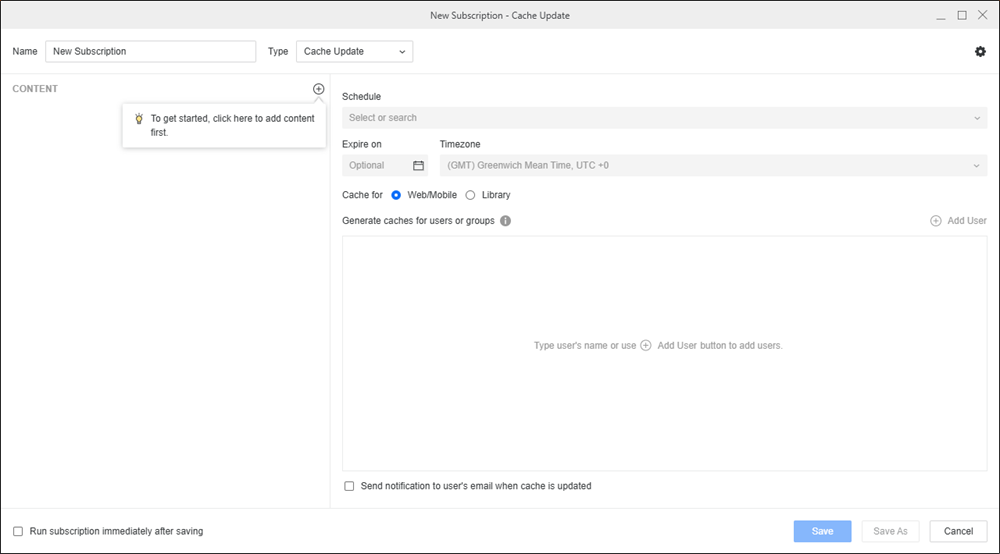
In Name, enter a descriptive name for the subscription.
-
From the Type drop-down, choose Cache Update.
-
To add content to the subscription, click
 in the Content pane.
 -
To only view schedules you own, toggle on Show my schedules only.
-
Once the schedule is set, you can optionally specify the date when the subscription should stop by selecting the date in Expire on or Stop After and choose a Timezone, if available.
-
You can choose to create a cache for Strategy Web/Mobile or Library (for dashboards).
-
Click on the empty field under Generate caches for users or groups to choose the cache subscription recipients.
-
To send a notification when the subscription executes and the cache is updated, select Send notification to user’s email when cache is updated.
-
You can choose to Run the subscription immediately after saving.
-
Click Save.
Open the Workstation page.